


What Is Logs Section of Staging Pro
The Logs section in WPvivid Staging Pro provides a centralized activity history for all staging-related operations, including staging site creation, updating, and deployment (pushing a staging site to live) actions. It helps administrators monitor staging task execution, identify errors, and verify successful operations.
Use Cases for Logs
Staging logs are useful for:
- Troubleshooting staging creation failures
- Debugging staging updates or deployment issues
- Providing diagnostic information to WPvivid support
- Auditing staging activity history
Accessing Logs
To view staging log records in WPvivid Staging Pro:
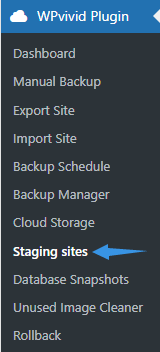
- Navigate to WPvivid Plugin → Staging Sites.
- Click the Staging Log tab.
The Logs interface displays all recorded staging operations in a structured table for easy review and management.
Log Information Displayed
Each staging log entry contains detailed operation metadata to help you understand what occurred during the staging process.
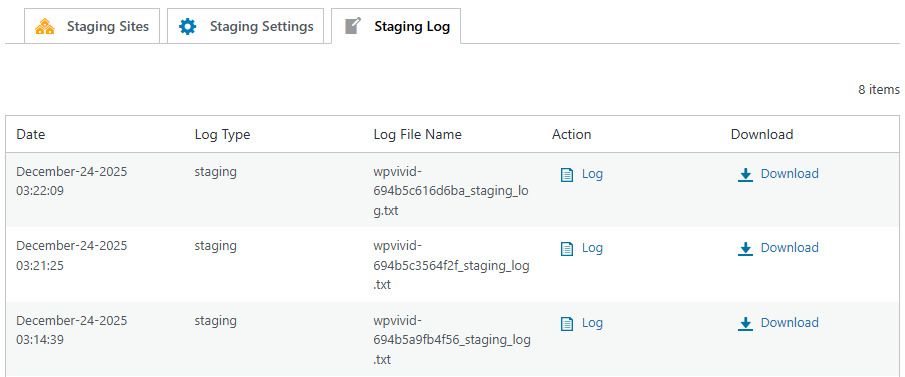
- Date
Displays the timestamp when the staging operation started. - Log File Name
Shows the automatically generated log file associated with the staging task. - View
Provides quick access to view the staging log details directly in the browser. - Download
Allows you to download the complete staging log file for offline analysis or support troubleshooting.
Viewing Log Details
To view a staging log entry:
- Locate the desired staging log record.
- Click the Log icon under the Action column.
The system will display the full execution output, including staging progress steps, file operations, database processing status, warnings, and error messages.
Downloading Log Files
To download a staging log file:
- Find the staging log entry you want to export.
- Click the Download icon in the Download column.
Downloaded staging logs can be attached to support tickets or archived for auditing and troubleshooting purposes.
When contacting WPvivid support about staging issues, always attach the corresponding staging log file. It contains detailed execution output and significantly speeds up issue diagnosis and resolution.