

Purpose of the Backup Page
The Backup page enables you to:
- 1. Pre-update safety backups
- 2. Site migration to another server or domain
WPvivid Backup Pro extends backup flexibility by allowing granular selection of databases, files, and exclusion rules, as well as support for remote storage destinations.
Backup Page Layout
The Backup page is organized into several logical sections that guide users through defining a backup configuration:
- 1. Backup Location
- 2. Backup Content Type
- 3. Database Selection
- 4. File and Folder Selection
- 3. Advanced Backup Settings
- 4. Backup Identification and Retention
Each section controls a specific aspect of the backup process and can be adjusted independently.
Backup Location
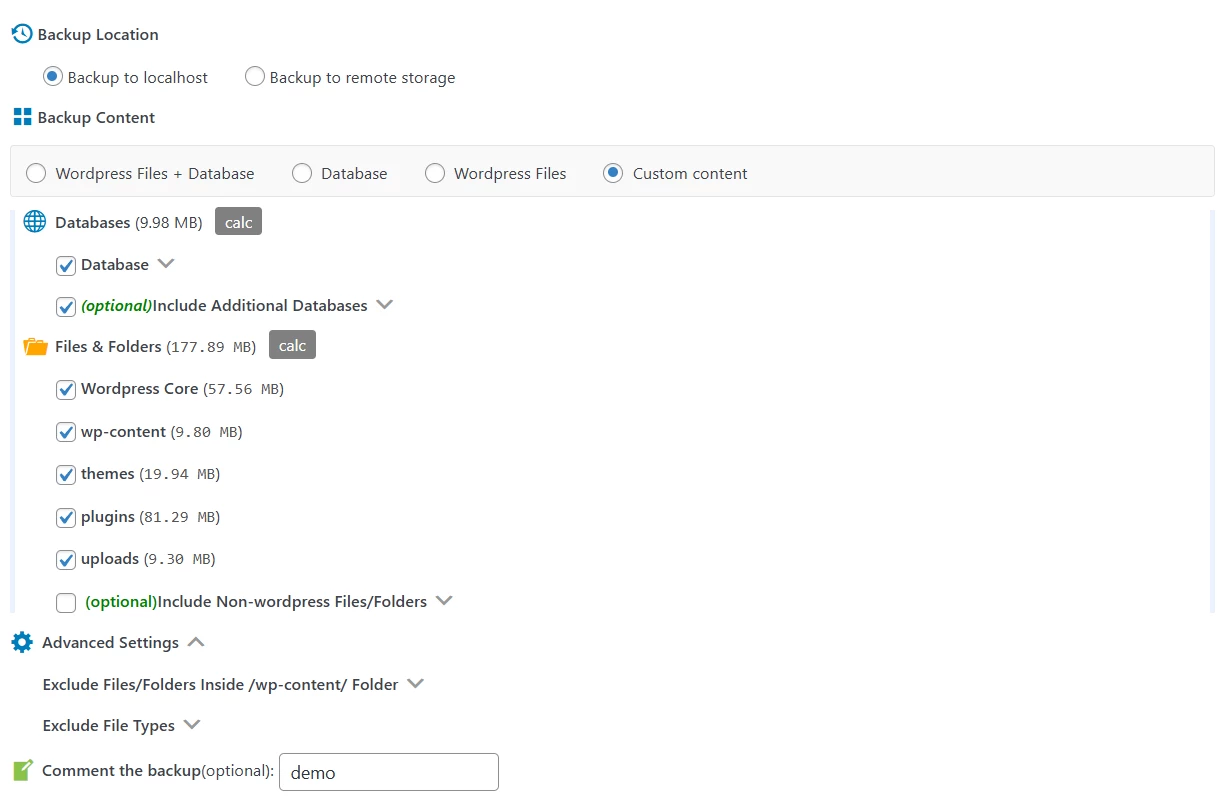
The Backup Location section defines where backup files are stored after creation.
WPvivid Backup Pro supports:
- 1. Local storage:
Backup files remain on the current server - 2. Remote storage:
Backups are automatically uploaded to a configured cloud storage service
This separation allows users to balance performance, storage capacity, and redundancy.
Backup Content Types
The Backup Content section determines the overall scope of the backup.
- 1. WordPress Files + Database
- 2. Database
- 3. WordPress Files
- 4. Custom backups with manual content selection
Database Backup Scope
When database backup is enabled, WPvivid Backup Pro provides options to control database inclusion.
- 1. Backing up the primary WordPress database
- 2. Optionally including additional databases on the same server
- 3. Displaying estimated database size before backup execution
This ensures database backups remain predictable and manageable.
Files and Folders Selection
The Files & Folders section controls which file system components are included in the backup.
- 1. WordPress core files
- 2. wp-content
- 3. Themes
- 4. Plugins
- 5. Uploads
- 6. Include Non-WordPress Files/Folders (Optional)
Allows custom directories outside the WordPress installation to be included./li>
A size calculation indicator helps evaluate backup impact before execution.
Advanced Settings
The Advanced Settings section provides fine-grained control over backup behavior.
These options allow users to:
- 1. Exclude specific directories within wp-content
- 2. Exclude files by extension
- 3. Reduce backup size and execution time
- 4. Avoid backing up temporary or unnecessary files
These controls are especially useful for large or resource-constrained sites.
Backup Identification and Retention
WPvivid Backup Pro includes features to help manage and identify backups:
- 1. Custom backup comments for descriptive labeling
- 2. Optional protection to prevent automatic deletion of important backups
- 3. Select Regenerate all thumbnails for all sizes.
- 4. Click Start Bulk Processing.
These features improve backup traceability and retention management.
Summary
The Backup page in WPvivid Backup Pro provides a comprehensive and flexible interface for creating manual WordPress backups. It enables users to:
- 1. Define backup storage locations
- 2. Select full, partial, or custom backup scopes
- 3. Control database and file inclusion
- 4. Optimize backup size and performance
- 5. Identify and protect important backups
This page serves as the foundation for reliable backup creation within WPvivid Backup Pro and supports restoration, migration, and disaster-recovery workflows.