

What Is Backup Scheduling
Backup scheduling automatically creates backups at predefined intervals without manual intervention. Once configured, WPvivid automatically creates backups in the background according to your schedule rules.
This automation ensures:
- Your website is backed up consistently and reliably
- Backups occur even when you’re away or busy
- No risk of forgetting to create backups manually
- Peace of mind knowing your site has recent recovery points
- Automatic cleanup of old backups based on retention policies
Available Schedule Types
WPvivid Pro supports both traditional full scheduled backups and incremental scheduled backups. Understanding the difference helps you choose the best strategy.
| Feature | General Backup Schedule | Incremental Backup Schedule |
|---|---|---|
| What’s Backed Up | Full or selected files/database tables each time | Only modified files changes and database |
| Backup Speed | Slower (full site every time) | Faster (only changes backed up) |
| Storage Consumption | Higher (complete copy each time) | Lower (only stores changes) |
| Bandwidth Usage | Higher (uploads entire site) | Lower (uploads only changes) |
| Server Resources | More intensive | Less intensive |
| Restore Points | Complete, standalone restore points | Requires base backup + incremental chain |
| Restore Complexity | Simple (single backup file) | More complex (multiple files) |
| Best For | Periodic full system snapshots, small to medium sites | Large sites with frequent updates |
| Ideal Frequency | Daily or weekly | Hourly or daily |
| Use Case | Sites needing simple, complete backup copies | Large sites requiring frequent backups with minimal overhead |
To reduce server resource usage, only one schedule type can be enabled at the same time. Choose the schedule type that best fits your site’s size and backup requirements.
Advanced Schedule Engine
Compared to the Free version, WPvivid Backup Pro provides significantly enhanced scheduling capabilities designed for advanced automation and flexible backup workflows:
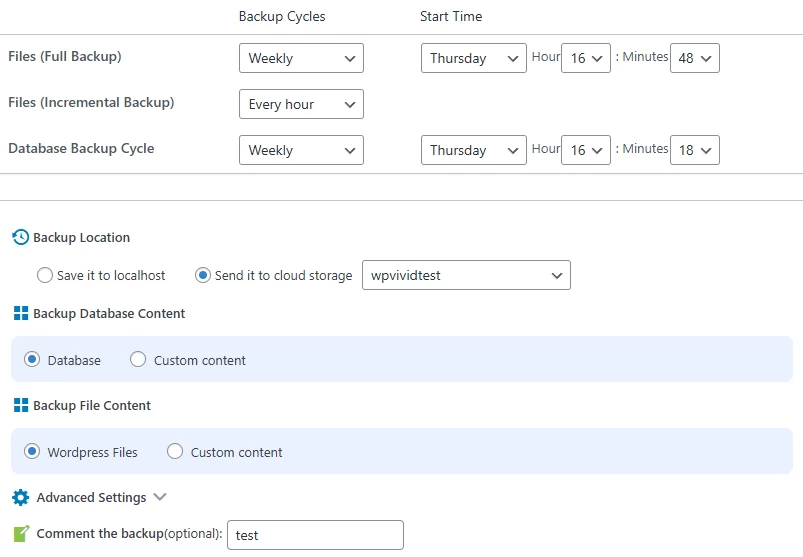
- Custom Start Times
You can specify the exact time when backups start. This allows you to schedule backups during low-traffic periods, avoid peak usage hours, and coordinate backup tasks with other scheduled server processes. - Flexible Backup Cycles
WPvivid Pro supports a wide range of scheduling intervals, including every 1, 2, 4, 8, or 12 hours, daily, every 2 days, weekly, fortnightly, and every 30 days. Multiple schedules can run simultaneously to support different backup strategies. - Custom Backup Content Selection
Each schedule can use its own content scope. You can select specific folders and file paths, choose individual database tables, exclude unnecessary or temporary data, and create specialized schedules for different content types. - Multiple Storage Destinations
WPvivid Pro allows scheduled backups to be uploaded to multiple cloud storage destinations at the same time, providing redundancy and geographic distribution for improved data safety. - Multiple Schedule Combinations
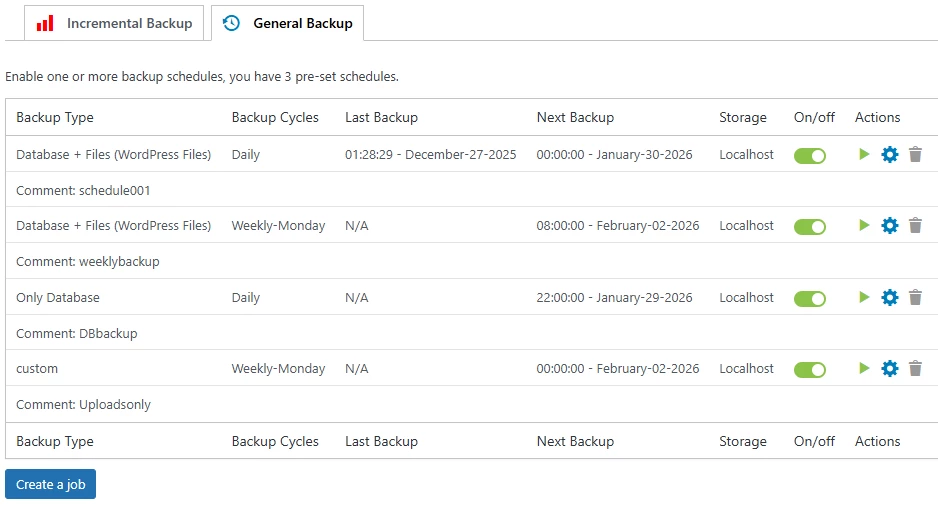
You can create multiple schedules with different configurations to build layered backup strategies, such as combining frequent database backups with less frequent full-site backups.
Common Schedule Configurations
Select schedule configurations based on your website size, update frequency, and business importance:
By Site Size
- Small Sites (Under 1 GB)
Daily full backups with a retention range of 7–14 backup versions. - Medium Sites (1–5 GB)
Daily full backups, or a combined strategy using daily database backups and weekly full-site backups. - Large Sites (5 GB+)
Daily incremental backups on a weekly full backup base to reduce storage usage and backup time. - Very Large Sites (20 GB+)
Custom schedules focusing on high-value content, with incremental backups as a core strategy for efficiency.
By Update Frequency
- Static or Rarely Updated Sites
Weekly full backups are typically sufficient. - Occasionally Updated Sites
Two to three full backups per week provide a balanced level of protection. - Frequently Updated Sites
Daily database backups combined with weekly full-site backups offer efficient coverage. - Constantly Updated Sites
Incremental backups every few hours on a weekly full backup base ensure minimal data loss.
By Site Criticality
- Personal or Low-Priority Sites
Weekly backups stored in a single storage location are usually sufficient. - Business or High-Importance Sites
Daily backups stored locally and on at least one remote storage destination are recommended. - E-commerce or Revenue-Critical Sites
Daily backups sent to multiple remote storage destinations, combined with shorter retention cycles and frequent backup intervals. - Enterprise or Mission-Critical Sites
Hourly incremental backups or daily full backups stored across multiple geographically distributed storage locations for maximum redundancy.
Best Practices for Backup Scheduling
Follow these best practices to maximize the effectiveness of scheduled backups:
- Schedule During Low-Traffic Periods
Run backups between 2-4 AM local time when server load and visitor traffic are typically lowest, minimizing performance impact. - Use Incremental for Large Sites
Sites over 5GB benefit significantly from incremental backups, which reduce backup time and storage requirements while maintaining daily protection. - Combine Schedule Types
Create separate schedules for database-only (daily) and full-site (weekly) backups to balance protection with server resources and storage costs. - Send Critical Backups to Multiple Destinations:
Use multi-destination storage for important scheduled backups to ensure redundancy and protect against single-point-of-failure scenarios. - Set Appropriate Retention
Balance recovery window needs with storage costs. Typical retention: 7-14 daily backups, 4-8 weekly backups, 3-6 monthly backups. - Monitor Schedule Execution
Regularly check that schedules are running successfully. Enable email notifications to stay informed of failures.
Limitations & Important Notes
Backup scheduling reliability depends on server configuration and WordPress cron behavior. Disabling WordPress cron or blocking background tasks may prevent scheduled backups from running properly.
Important considerations include:
- Some hosting environments may restrict cron execution
- Extremely large websites may require longer processing times
- Low-traffic websites may experience delayed cron triggers
If your hosting provider supports real system cron jobs, configure a server-side cron task to trigger WPvivid for more accurate and reliable scheduling.