


WPvivid Backup Pro enables you to create custom database backups by selecting specific tables. This flexibility allows you to tailor backups to your exact requirements. In this article, we will explore how to create a custom database backup with WPvivid Backup Pro.
Database Backup Options in WPvivid Backup Pro
When configuring a custom backup, WPvivid categorizes your database into three main groups to help you make informed decisions:
- 1. WordPress Default Tables:
This option backs up the default WordPress database, which contains all standard WordPress tables and plugin data stored in those tables. This is the recommended choice for most sites since it captures all core and plugin-related content./li> - 2. Other Tables:
These are tables generated by your active plugins and themes. Select these with caution, as excluding them may cause certain plugin features to lose data upon restoration. - 3. Tables with Different Prefixes:
If your database contains tables with prefixes other than your site’s default, WPvivid allows you to identify and include these as needed. - 4. Including Additional External Databases:
If your database contains tables with prefixes other than your site’s default, WPvivid allows you to identify and include these as needed.
How to Create the Custom Database Backup (Step-by-Step)
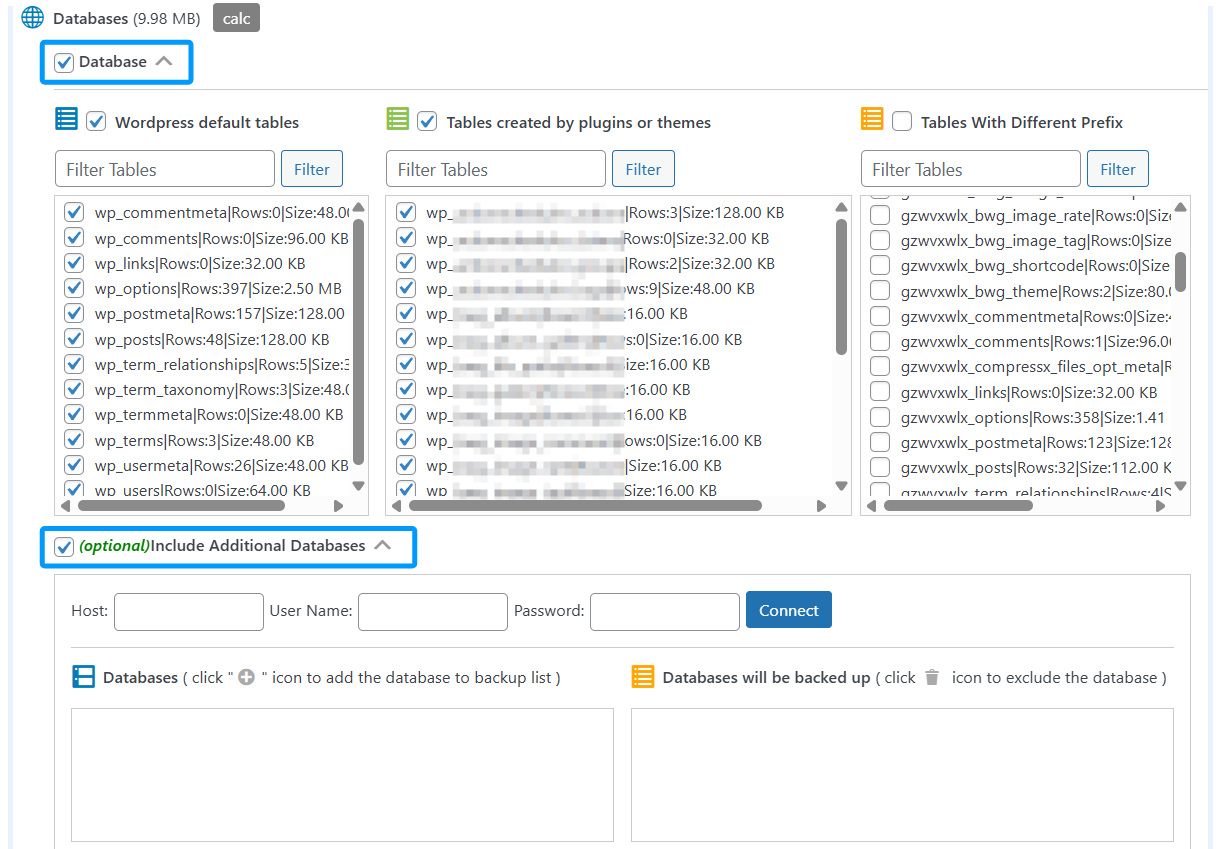
To perform a custom database backup, follow these steps:
- 1. Navigate to the Plugin Dashboard:
Open your WordPress admin area and go to the WPvivid Backup menu. - 2. Choose Storage Location:
Select whether to save the backup to your Localhost or a configured Remote Storage (e.g., Google Drive, Dropbox). - 3. Select Backup Content:
Locate the section labeled Backup Content and choose Custom content. - 4. Select the Database option:
A list of all detected tables will appear. - 5. Select Your Tables:
Check the boxes for the tables you wish to include. You can use the category filters (Default, Other, Different Prefixes) to navigate the list quickly. - 6. Run the Backup:
Click the Backup Now button to start the process.