


WPvivid Backup Plugin Advanced Settings allow you to fine-tune backup and restore behavior for improved compatibility, performance, and reliability. These options provide greater control over compression methods, database access methods, execution limits, chunk sizes, and recovery processes.
Advanced Settings Explanation
Tip
Advanced Settings directly affect backup and restore stability, only modify these settings if you have followed instructions provided in WPvivid documentation or received guidance from WPvivid support.
Advanced Settings directly affect backup and restore stability, only modify these settings if you have followed instructions provided in WPvivid documentation or received guidance from WPvivid support.
Database Access Method
Select how WPvivid accesses your WordPress database during backup and restore operations.

- WPDB (Default)
Uses WordPress native database functions. This option offers maximum compatibility but may be slower for large databases. - PDO (Recommended)
Uses the PHP PDO extension for faster database processing. This option requires the pdo_mysql extension to be installed on your server.
Tip
Choose PDO when available to improve backup and restore speed, especially for large databases.
Choose PDO when available to improve backup and restore speed, especially for large databases.
Backup Compression Method
Configure how WPvivid compresses backup archives.

- ZipArchive (Default)
Provides better flexibility and faster performance. Requires the PHP ZIP extension. - PclZip
A slower but more stable fallback method included in WordPress core. WPvivid automatically switches to this method if ZipArchive is unavailable.
Note
If your server does not support ZipArchive, WPvivid will automatically use PclZip to maintain backup compatibility.
If your server does not support ZipArchive, WPvivid will automatically use PclZip to maintain backup compatibility.
Backup Performance Mode
Adjust how aggressively WPvivid uses server resources during backup creation.
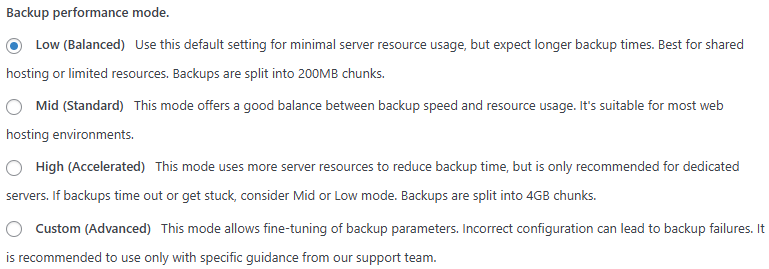
- Low (Balanced)
Minimizes server resource usage. Best for shared hosting or limited environments. Backup files are split into 200MB chunks. - Mid (Standard)
Provides a balanced combination of speed and stability. Recommended for most hosting environments. - High (Accelerated)
Uses more server resources to reduce backup time. Recommended only for VPS or dedicated servers. Backup files are split into 4GB chunks. - Custom (Advanced)
Access advanced parameters to manually configure backup splitting, compression, and processing.
Tip
If backups frequently fail or time out, switch to Low or Mid mode to improve stability.
If backups frequently fail or time out, switch to Low or Mid mode to improve stability.
Custom Backup Processing Settings
Unlocks full backup processing options and allows fine-grained control over backup behavior. This mode is intended for complex hosting environments or large websites. It is recommended to adjust these settings only under guidance from WPvivid documentation or support.
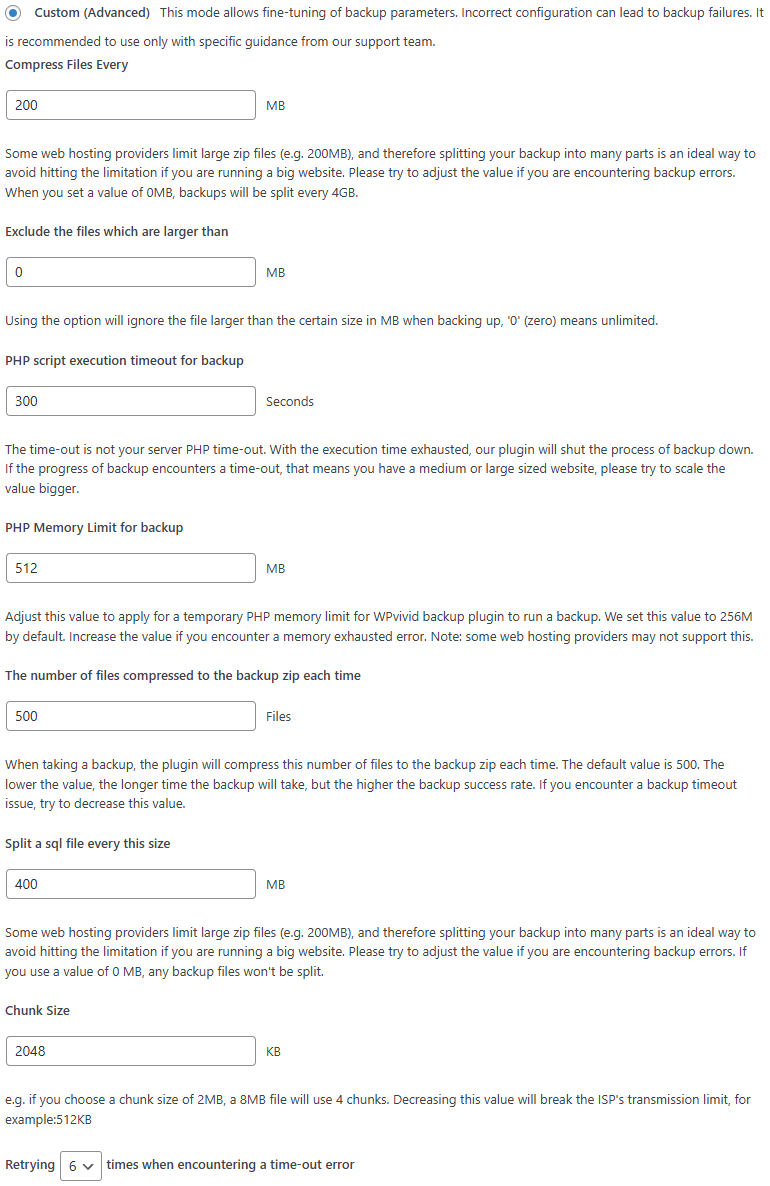
- Compress files every (MB)
Defines the file size threshold for splitting backup archives into multiple parts. Smaller values improve compatibility on restricted hosting environments. - Exclude files larger than (MB)
Skips files that exceed the specified size limit during backup. Set to 0 for unlimited file size. - PHP script execution timeout for backup (seconds)
Sets the maximum execution time allowed for each backup request cycle. - PHP memory limit for backup (MB)
Temporarily increases the memory available to WPvivid during backup operations. - Number of files compressed per request
Controls how many files are compressed in each batch. Lower values improve stability but increase backup duration. - Split SQL file every (MB)
Splits large database exports into multiple SQL files to avoid server file size limitations. - Chunk size (KB)
Controls how much data is processed per request. Smaller chunks reduce timeout risk on restrictive servers. - Retry attempts on timeout
Specifies how many retry attempts WPvivid will perform when a timeout error occurs.
Restore Performance Settings
Control how WPvivid restores backup files and database data.
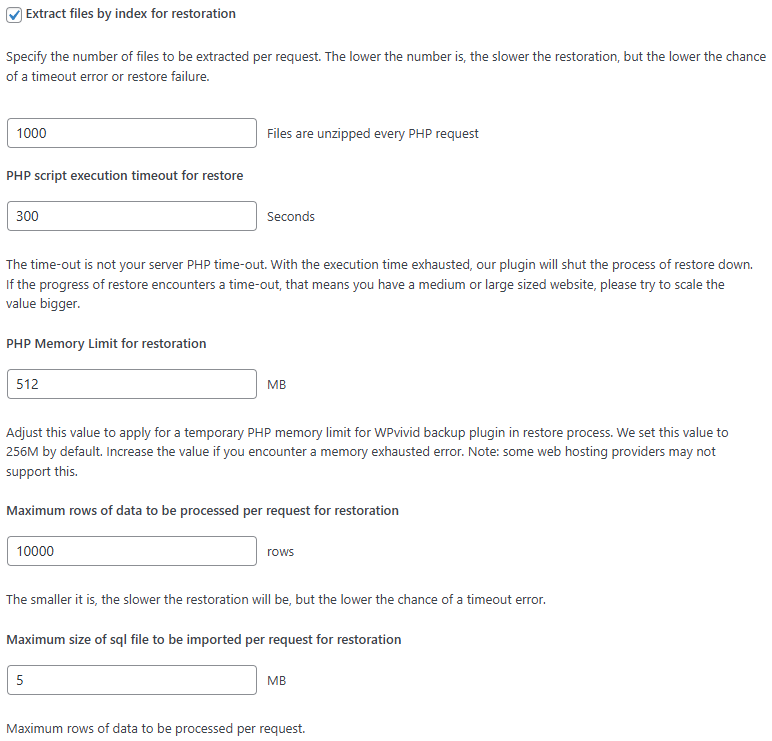
- Extract files by index for restoration
Enables indexed extraction to reduce server load and improve restore reliability. - Files extracted per request
Defines how many files are unzipped per request cycle. Lower values reduce timeout risk. - PHP script execution timeout for restore (seconds)
Sets the maximum allowed execution time for restore operations. - PHP memory limit for restore (MB)
Temporarily increases memory availability during restore processing. - Maximum database rows processed per request
Limits how many database rows are imported during each restore cycle. - Maximum SQL file size imported per request (MB)
Controls how much SQL data is processed per request to avoid server execution limits.
Tip
If restore operations time out or stall, adjust these settings based on the recommendations in this guide.
If restore operations time out or stall, adjust these settings based on the recommendations in this guide.