

What Is Backup Scheduling
WPvivid Backup Scheduling is an automated system that creates backups of your WordPress website based on a predefined timetable.
Instead of manually triggering backups, WPvivid performs backup tasks in the background according to your selected schedule.
Key benefits include:
- Continuous data protection
- Reduced manual maintenance
- Consistent backup frequency
- Improved recovery readiness
How WPvivid Backup Scheduling Works
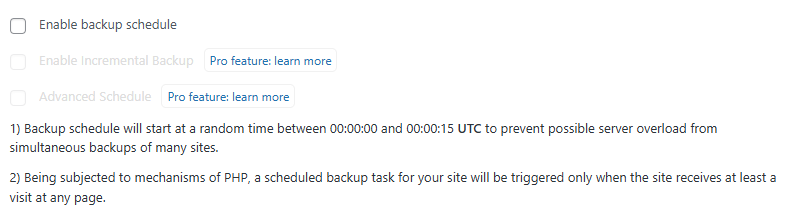
WPvivid utilizes WordPress cron to trigger scheduled backups. Once enabled, the backup is initiated at a random interval between 00:00:00 and 00:00:15 UTC.
When a scheduled task triggers:
- The backup process starts in the background
- Selected website data is packaged into backup files
- Backup files are stored locally or uploaded to configured remote storage
- Execution logs are recorded for monitoring and troubleshooting
Because scheduled backups rely on WordPress cron (PHP-based execution), backup tasks are triggered only when your website receives at least one visit to any page. On low-traffic websites, this may cause slight delays compared to the exact scheduled time.
What Can Be Scheduled
WPvivid allows you to control exactly which website data is included in scheduled backups. This flexibility helps balance backup coverage and storage usage based on your needs.

You can schedule backups for:
- WordPress database only
- WordPress files only
- Full website backups (files + database)
Available Backup Schedule Types
WPvivid Backup Plugin provides multiple scheduling frequencies to match different website update patterns.

Available schedule options include:
- Every 12 hours
- Daily backups
- Weekly backups
- Fortnightly backups
- Monthly backups
High-traffic or frequently updated websites benefit from more frequent backups, while static websites can use longer intervals.
Storage Destination Behavior
Scheduled backups can be stored locally or automatically uploaded to supported remote storage providers.

Supported destinations include:
- Local server storage
- Google Drive
- Dropbox
- Microsoft OneDrive
- Amazon S3
- DigitalOcean Spaces
- FTP/SFTP servers
Storage behavior:
- Backups are created locally first
- Remote uploads begin after backup generation completes
- Each scheduled task follows its assigned destination rules
Remote storage helps protect backups from server failures and improves data redundancy.
Common Use Cases
WPvivid Backup Scheduling is widely used across different website scenarios:
- Business websites requiring continuous data protection
- E-commerce stores with frequent order updates
- Content-heavy blogs publishing daily articles
- Agency-managed client websites
- Staging and development environments
Limitations & Important Notes
Backup scheduling reliability depends on server configuration and WordPress cron behavior. Disabling WordPress cron or blocking background tasks may prevent scheduled backups from running properly.
Important considerations include:
- Some hosting environments may restrict cron execution
- Extremely large websites may require longer processing times
- Low-traffic websites may experience delayed cron triggers
If your hosting provider supports real system cron jobs, configure a server-side cron task to trigger WPvivid for more accurate and reliable scheduling.